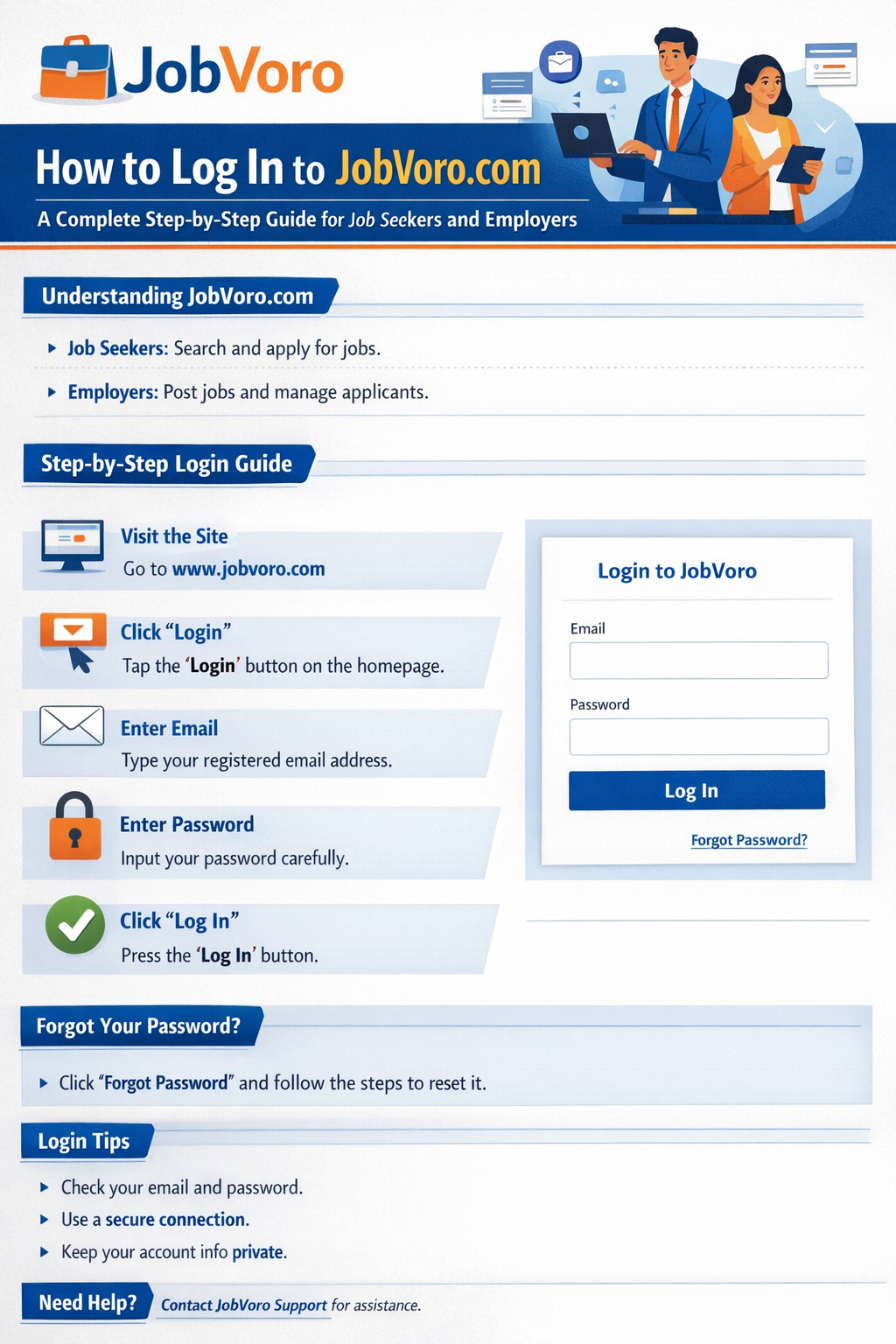
How to Login to JobVoro.com: A Complete Step-by-Step Guide for Job Seekers and Employers
In today’s digital hiring environment, accessing the right job platform quickly and securely is essential. JobVoro.com is designed to connect job seekers with employers efficiently, and the first step to using its full features is logging into your account correctly.
This comprehensive guide explains how to log in to JobVoro.com, whether you are a job seeker, an employer, or a returning user. It also covers common login issues, password recovery, security tips, and best practices to ensure smooth access every time.
Understanding the JobVoro Login System
JobVoro uses a secure account-based system that allows users to manage applications, job postings, company profiles, and saved opportunities. Logging in verifies your identity and grants access to personalized features that are not available to guest users.
There are two primary types of users on JobVoro:
Job Seekers – individuals searching and applying for jobs
Employers – companies posting vacancies and managing candidates
Although both user types use the same login process, the dashboards they access after login are different.
Step-by-Step Guide to Logging in to JobVoro.com
Step 1: Visit the Official Website
Open your web browser and go to:
https://www.jobvoro.com
Always ensure the URL is correct to avoid phishing or fake websites.
Step 2: Locate the Login Button
On the homepage, look for the “Login” or “Sign In” button, usually found:
At the top-right corner of the website
Or within the main navigation menu on mobile devices
Clicking this button will redirect you to the JobVoro login page.
Step 3: Enter Your Login Credentials
On the login page, you will see fields requesting:
Email Address – the email you used during registration
Password – your account password
Enter your details carefully. Passwords are case-sensitive, so check for typing errors.
Step 4: Click “Login”
After entering your credentials, click the Login button.
If your information is correct, you will be redirected instantly to your dashboard.
What Happens After You Log In?
For Job Seekers
Once logged in, job seekers can:
Apply for jobs directly
Save jobs for later
Upload or update their CV
Track application status
Manage profile information
Receive job alerts
For Employers
Employers gain access to:
Job posting tools
Candidate management
Application tracking
Company profile editing
Employer analytics and insights
How to Log In on Mobile Devices
JobVoro is fully mobile-responsive, meaning you can log in easily using a smartphone or tablet.
Mobile Login Tips:
Use a modern browser (Chrome, Safari, Edge)
Ensure a stable internet connection
Tap the menu icon if the login button isn’t immediately visible
Avoid public Wi-Fi for security reasons
The login steps on mobile are identical to desktop login.
Forgot Your JobVoro Password? Here’s How to Recover It
If you forget your password, JobVoro provides a secure recovery process.
Step-by-Step Password Reset:
Click “Forgot Password?” on the login page
Enter your registered email address
Check your email inbox for a password reset link
Click the link and create a new password
Return to JobVoro.com and log in with the new password
If you don’t see the email, check your spam or junk folder.
Common JobVoro Login Problems and Solutions
1. Incorrect Email or Password
Double-check spelling
Turn off Caps Lock
Reset your password if unsure
2. Account Not Found
This usually means:
You registered using a different email
Your account has not been verified yet
Try searching your inbox for a JobVoro registration email.
3. Login Page Not Loading
Possible causes include:
Browser cache issues
Slow internet connection
Temporary server maintenance
Solution:
Clear your browser cache or try a different browser.
4. Redirect or Access Error
If you experience redirect loops:
Log out completely
Clear cookies
Reload the site
Log in again
Security Tips for Safe JobVoro Login
Keeping your account secure is crucial, especially when personal or company data is involved.
Best Security Practices:
Use a strong password with letters, numbers, and symbols
Do not share login credentials
Avoid logging in on public computers
Log out after using shared devices
Keep your email account secure
JobVoro uses HTTPS encryption to protect all login sessions.
Can You Log In Without an Account?
No. To access JobVoro’s core features, you must first create an account.
How to Register:
Click Sign Up
Choose Job Seeker or Employer
Fill in required details
Verify your email
Log in after confirmation
Registration is free for job seekers.
Why Logging In Is Important on JobVoro
Logging in unlocks the full value of the platform. Without logging in, users cannot:
Apply for jobs
Track applications
Save job listings
Communicate with employers
Manage profiles
For employers, login is essential for posting and managing job vacancies.
Troubleshooting Login Issues with JobVoro Support
If login issues persist:
Ensure your account is verified
Try resetting your password
Contact JobVoro support via the contact page
Provide clear details such as:
Email used
Error messages shown
Browser and device used
Frequently Asked Questions About JobVoro Login
Is JobVoro login free?
Yes. Logging in is free for all registered users.
Can I log in from multiple devices?
Yes, but avoid simultaneous logins from unknown locations for security.
How long does a login session last?
Sessions expire automatically after inactivity for security reasons.
Can employers and job seekers use the same login page?
Yes. JobVoro automatically routes users to the correct dashboard.
Final Thoughts
Logging into JobVoro.com is simple, secure, and essential for accessing the platform’s powerful job-matching features. Whether you are searching for your next career opportunity or managing recruitment for your company, understanding the login process ensures a smooth experience.
By following the steps outlined in this guide, you can log in confidently, resolve common issues quickly, and protect your account from unauthorized access.
If you are new to JobVoro, create your account today and take the first step toward smarter hiring or career growth.